
This course is part of our elite learning catalog and is widely chosen by global organizations to train their technical teams.


The Elevate Certified DevOps Engineer Program offers an in-depth training experience focused on mastering cloud-based DevOps solutions. This course includes advanced learning aligned with AWS DevOps Engineer – Professional (DOP-C01) certification and practical exposure to industry-standard tools such as Git, GitHub, Jenkins, Maven, Ansible, Kubernetes, and Terraform. Designed to meet the needs of today’s cloud-driven environments, this program prepares you for real-world challenges and guarantees 100% placement support upon completion.
This course is part of our elite learning catalog and is widely chosen by global organizations to train their technical teams.
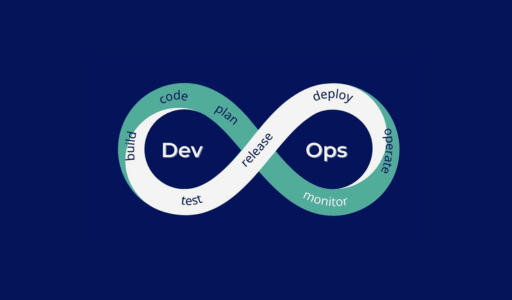
The Elevate Certified DevOps Engineer Program is designed to equip learners with the essential skills and tools needed to excel in today’s fast-paced DevOps environments. This hands-on course immerses participants in core DevOps practices such as continuous integration, continuous deployment, automation, and cloud-based workflows. Guided by industry experts, learners will explore how to bridge the gap between development and operations, streamline workflows, and enhance software delivery processes. By the end of the program, participants will be prepared to apply DevOps principles in real-world scenarios with confidence.
This course aims to provide a deep understanding of the DevOps ecosystem, focusing on key areas that include Continuous Integration (CI), Continuous Deployment (CD), Infrastructure as Code (IaC), automation tools, cloud platform integration, and system monitoring. Through practical exercises and real-time application, learners will build the technical foundation and operational mindset required to implement efficient, scalable, and secure DevOps solutions across various environments.
Software development lifecycle (SDLC) concepts, phases, and models
Pipeline deployment patterns for single- and multi-account environments
Configuring code, image, and artifact repositories
Using version control to integrate pipelines with application environments
Setting up build processes (for example, AWS CodeBuild)
Managing build and deployment secrets (for example, AWS Secrets Manager, AWS Systems Manager Parameter Store)
Determining appropriate deployment strategies (for example, AWS CodeDeploy)
Different types of tests (for example, unit tests, integration tests, acceptance tests, user interface tests, security scans)
Reasonable use of different types of tests at different stages of the CI/CD pipeline
Running builds or tests when generating pull requests or code merges (for example, AWS CodeCommit, CodeBuild)
Running load/stress tests, performance benchmarking, and application testing at scale
Measuring application health based on application exit codes
Automating unit tests and code coverage
Invoking AWS services in a pipeline for testing
Artifact use cases and secure management
Methods to create and generate artifacts
Artifact lifecycle considerations
Creating and configuring artifact repositories (for example, AWS CodeArtifact, Amazon S3, Amazon Elastic Container Registry [Amazon ECR])
Configuring build tools for generating artifacts (for example, CodeBuild, AWS Lambda)
Automating Amazon EC2 instance and container image build processes (for example, EC2 Image Builder)
Deployment methodologies for various platforms (for example, Amazon EC2, Amazon Elastic Container Service [Amazon ECS], Amazon Elastic Kubernetes Service [Amazon EKS], Lambda)
Application storage patterns (for example, Amazon Elastic File System [Amazon EFS], Amazon S3, Amazon Elastic Block Store [Amazon EBS])
Mutable deployment patterns in contrast to immutable deployment patterns
Tools and services available for distributing code (for example, CodeDeploy, EC2 Image Builder)
Configuring security permissions to allow access to artifact repositories (for example, AWS Identity and Access Management [IAM], CodeArtifact)
Configuring deployment agents (for example, Code Deploy agent)
Troubleshooting deployment issues
Using different deployment methods (for example, blue/green, canary)
Infrastructure as code (laC) options and tools for AWS
Change management processes for laC-based platforms
Configuration management services and strategies
Composing and deploying laC templates (for example, AWS Serverless Application Model [AWS SAM], AWS CloudFormation, AWS Cloud Development Kit [AWS CDK])
Applying CloudFormation StackSets across multiple accounts and AWS Regions
Determining optimal configuration management services (for example, AWS OpsWorks, AWS Systems Manager, AWS Config, AWS AppConfig)
Implementing infrastructure patterns, governance controls, and security standards into reusable laC templates (for example, AWS Service Catalog, CloudFormation modules, AWS CDK) Task Statement
AWS account structures, best practices, HRS and related AWS services
Standardizing and automating HRS account provisioning and configuration
Creating, consolidating, and centrally managing accounts (for example, AWS Organizations, AWS Control Tower)
Applying IAM solutions for multi-account and complex organization structures (for example, SCPs, assuming roles)
Implementing and developing governance and security controls at scale (AWS Config, AWS Control Tower, AWS Security Hub, Amazon Detective, Amazon GuardDuty, AWS Service Catalog, SCPs)
AWS services and solutions to automate tasks and processes
Methods and strategies to interact with the AWS software-defined infrastructure
Automating system inventory, configuration, and patch management (for example, Systems Manager, AWS Config)
Developing Lambda function automations for complex scenarios (for example, AWS SDKs, Lambda, AWS Step Functions)
Automating the configuration of software applications to the desired state (for example, Ops Works, Systems Manager State Manager)
Maintaining software compliance (for example, Systems Manager)
Multi-AZ and multi-Region deployments (for example, compute layer, data layer)
SLAs
Replication and failover methods for stateful services
Techniques to achieve high availability (for example, Multi-AZ, multi-Region)
Translating business requirements into technical resiliency needs
Identifying and remediating single points of failure in existing workloads
Enabling cross-Region solutions where available (for example, Amazon DynamoDB, Amazon RDS, Amazon Route 53, Amazon S3, Amazon CloudFront)
Configuring load balancing to support cross-AZ services
Configuring applications and related services to support multiple Availability Zones and Regions while minimizing downtime
Appropriate metrics for scaling services
Loosely coupled and distributed architectures
Serverless architectures
Container platforms
Identifying and remediating scaling issues
Identifying and implementing appropriate auto scaling, load balancing, and caching solutions
Deploying container-based applications (for example, Amazon ECS, Amazon EKS)
Deploying workloads in multiple Regions for global scalability
Configuring serverless applications (for example, Amazon API Gateway, Lambda, AWS Fargate)
Disaster recovery concepts (for example, RTO, RPO)
Backup and recovery strategies (for example, pilot light, warm standby)
Recovery procedures
Testing failover of Multi-AZ and multi-Region workloads (for example, Amazon RDS, Amazon Aurora, Route 53, CloudFront)
Identifying and implementing appropriate cross-Region backup and recovery strategies (for example, AWS Backup, Amazon S3, Systems Manager)
Configuring a load balancer to recover from backend failure
How to monitor applications and infrastructure
Amazon CloudWatch metrics (for example, namespaces, metrics, dimensions, and resolution)
Real-time log ingestion
Encryption options for at-rest and in-transit logs and metrics (for example, client-side and server-side, AWS Key Management Service [AWS KMS])
Security configurations (for example, IAM roles and permissions to allow for log collection)
Securely storing and managing logs
Creating CloudWatch metrics from log events by using metric filters
Creating CloudWatch metric streams (for example, Amazon S3 or Amazon Kinesis Data Firehose options)
Collecting custom metrics (for example, using the CloudWatch agent)
Managing log storage lifecycles (for example, S3 lifecycles, CloudWatch log group retention)
Processing log data by using CloudWatch log subscriptions (for example, Kinesis, Lambda, Amazon OpenSearch Service)
Searching log data by using filter and pattern syntax or CloudWatch Logs Insights
Configuring encryption of log data (for example, AWS KMS)
Anomaly detection alarms (for example, CloudWatch anomaly detection)
Common CloudWatch metrics and logs (for example, CPU utilization with Amazon EC2, queue length with Amazon RDS, 5xx errors with an Application Load Balancer [ALB])
Amazon Inspector and common assessment templates
AWS Config rules
AWS CloudTrail log events
Building CloudWatch dashboards and Amazon QuickSight visualizations
Associating CloudWatch alarms with CloudWatch metrics (standard and custom)
Configuring AWS X-Ray for different services (for example, containers, API Gateway, Lambda)
Analyzing real-time log streams (for example, using Kinesis Data Streams)
Analyzing logs with AWS services (for example, Amazon Athena, CloudWatch Logs Insights)
Event-driven, asynchronous design patterns (for example, S3 Event Notifications or Amazon EventBridge events to Amazon Simple Notification Service [Amazon SNS] or Lambda)
Capabilities of auto scaling for a variety of AWS services (for example, EC2 Auto Scaling groups, RDS storage auto scaling, DynamoDB, ECS capacity provider, EKS autoscalers)
Alert notification and action capabilities (for example, CloudWatch alarms to Amazon SNS, Lambda, EC2 automatic recovery)
Health check capabilities in AWS services (for example, ALB target groups, Route 53)
Configuring solutions for auto scaling (for example, DynamoDB, EC2 Auto Scaling groups, RDS storage auto scaling, ECS capacity provider)
Creating CloudWatch custom metrics and metric filters, alarms, and notifications (for example, Amazon SNS, Lambda)
Configuring S3 events to process log files (for example, by using Lambda) and deliver log files to another destination (for example, OpenSearch Service, CloudWatch Logs)
Configuring EventBridge to send notifications based on a particular event pattern
Installing and configuring agents on EC2 instances (for example, AWS Systems Manager Agent [SSM Agent], CloudWatch agent)
Configuring AWS Config rules to remediate issues
Configuring health checks (for example, Route 53, ALB)
AWS services that generate, capture, and process events (for example, AWS Health, EventBridge, CloudTrail)
Event-driven architectures (for example, fan out, event streaming, queuing)
Integrating AWS event sources (for example, AWS Health, EventBridge, CloudTrail)
Building event processing workflows (for example, Amazon Simple Queue Service [Amazon SQS], Kinesis, Amazon SNS, Lambda, Step Functions)
Fleet management services (for example, Systems Manager, AWS Auto Scaling)
Configuration management services (for example, AWS Config)
Applying configuration changes to systems
Modifying infrastructure configurations in response to events
Remediating a non-desired system state Task Statement
AWS metrics and logging services (for example, CloudWatch, X-Ray)
AWS service health services (for example, AWS Health, CloudWatch, Systems Manager OpsCenter)
Root cause analysis
Analyzing failed deployments (for example, AWS CodePipeline, CodeBuild, CodeDeploy, CloudFormation, CloudWatch synthetic monitoring)
Analyzing incidents regarding failed processes (for example, auto scaling, Amazon ECS, Amazon EKS)
Appropriate usage of different IAM entities for human and machine access (for example, users, groups, roles, identity providers, identity-based policies, resource-based policies, session HRS policies)
Identity federation techniques (for example, using IAM identity providers and AWS IAM Identity Center [AWS Single Sign-On])
Permission management delegation by using IAM permissions boundaries
Organizational SCPs
Designing policies to enforce least privilege access
Implementing role-based and attribute-based access control patterns
Automating credential rotation for machine identities (for example, Secrets Manager)
Managing permissions to control access to human and machine identities (for example, enabling multi-factor authentication [MFA], AWS Security Token Service [AWS STS], IAM profiles)
Network security components (for example, security groups, network ACLS, routing, AWS Network Firewall, AWS WAF, AWS Shield)
Certificates and public key infrastructure (PKI)
Data management (for example, data classification, encryption, key management, access controls)
Automating the application of security controls in multi-account and multi-Region environments (for example, Security Hub, Organizations, AWS Control Tower, Systems Manager)
Combining security controls to apply defense in depth (for example, AWS Certificate Manager [ACM], AWS WAF, AWS Config, AWS Config rules, Security Hub, GuardDuty, security groups, network ACLS, Amazon Detective, Network Firewall)
Automating the discovery of sensitive data at scale (for example, Amazon Macie)
Encrypting data in transit and data at rest (for example, AWS KMS, AWS CloudHSM, ACM)
Security auditing services and features (for example, CloudTrail, AWS Config, VPC Flow Logs, CloudFormation drift detection)
AWS services for identifying security vulnerabilities and events (for example, GuardDuty, Amazon Inspector, IAM Access Analyzer, AWS Config)
Common cloud security threats (for example, insecure web traffic, exposed AWS access keys, S3 buckets with public access enabled or encryption disabled)
Implementing robust security auditing
Configuring alerting based on unexpected or anomalous security events
Configuring service and application logging (for example, CloudTrail, CloudWatch Logs)
Analyzing logs, metrics, and security findings
Why DevOps?
What is DevOps?
DevOps Market Trends?
DevOps Engineer Skills
DevOps Tools chain
Addressing Challenges through DevOps
Workflow of DevOps
DevOps Delivery Pipeline
DevOps Ecosystem
What is version control?
What is Git?
Why Git for your organization
Install Git
Common commands in Git
Working with Remote Repositories
Advantages of Distributed VCS
Branching and Merging in Git
Git workflows
Git cheat sheet
What is CI
Why CI is Required
Introduction to Jenkins (With Architecture)
Introduction to Maven
Jenkins Management Preview
Adding a slave node to Jenkins
Build & Delivery Pipeline
Auto Deployment in Jenkins
Pipeline as a Code
Implementation of Jenkins in the Project
Docker overview
Installing Docker
Pulling images (Docker Pull)
Running images (Docker run)
Elysium Academy Private Limited. All Rights Reserved.
Docker build and deployment- Connecting to running images (Docker exec)
Exposing volumes and ports
Inspecting system (Docker PS, docker status)
Using docker-compose to connect containers
Exposing volumes and ports
Introduction to Ansible, Ansible mechanism.
Ansible installation in AWS instance. Ansible configuration, playing with Ansible ad-hoc commands, creating a simple playbook, Playbook advanced - variables, loop, condition, roles.
Introduction to Terraform
Installation of Terraform
Merging Terraform with AWS
Creating TF file
Building full cloud architecture using Terraform
Terraform backend
Terraform variables
Terraform state
Terraform locals
Terraform destroy
Used for event monitoring & alerting
Record real-time metrics in a time series Database (TSDB)
Build using a HTTP pull model, with flexible queries and real-time alerting
Node Exporter- Software that you can install on "NIX Kernel (Linux, openBSD, FreeBSD or Darwin)
Introduction to Splunk
Necessity of Logs
Why Splunk?
Splunk Components
Search Heads
Indexes
Forwarders
Installation of Splunk
Installation of Splunk Forwarder
Splunk Search
Splunk Alerts
Splunk Dashboards
Kubernetes Introduction & Architecture
Kubernetes Installation - KOPS Method
Kubernetes - Clusters, Pod, Namespace
Deployment in Kubernetes
Kubernetes - Replica set, Demon Set, ConfigMap, Service
Services in K8s - Nodeport, ClusterIP, Load balancer, Ingress service
Persistent Volume, Persistent Volume Claim
Dashboards in Kubernetes
Gain expertise in the full DevOps lifecycle—learn everything from building CI/CD pipelines to managing containers and automation tools. This course covers every key area of modern DevOps engineering.
Apply your knowledge through hands-on labs and practical projects. Simulate real deployment environments to build confidence and technical skills.
Get thoroughly prepared for the Elevate Certified DevOps Engineer exam with dedicated resources including mock tests, study guides, and instructor tips.
Train under skilled professionals with deep industry experience. Our mentors offer expert insights and personalized support throughout your learning journey.
Study your way—attend live sessions online or join in-person classes. Our program is designed to fit into your schedule without compromising on quality.
Add a globally recognized DevOps certification to your profile. Benefit from resume-building assistance, career guidance, and job placement support to take your next step with confidence.